OpenSkiesNav has both visual and audio in-flight alerts covering all major hazard categories. Each alert category can be enabled/disabled individually and configured for custom thresholds.
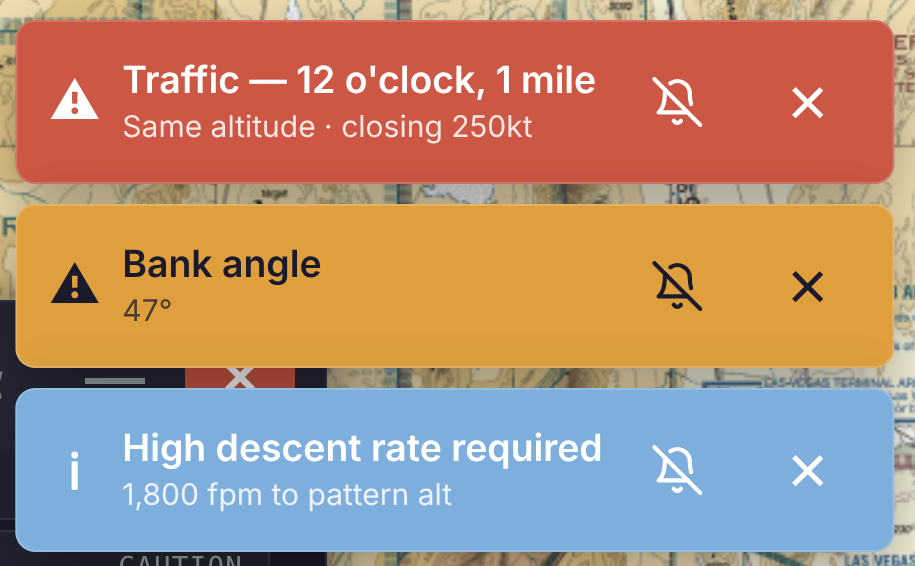
These alerts are easily identified in three levels. Red for Warning. Orange for Caution. Blue for Advisory.
Terrain and Obstacle Avoidance
OpenSkiesNav monitors current altitude and compares it to known terrain and obstacles ahead on the track. The warning alert repeats every five seconds unless silenced. There are two severity levels: Caution and Warning. The threshold for both terrain and obstacle alerts is editable, but these are the defaults.
Terrain
- Warning: <200 feet clearance
- Caution: <500 feet clearance
Obstacles
- Warning: <50 feet clearance
- Caution: <200 feet clearance
Airspace Proximity Alerts
This alert warns pilot of approaching controlled airspace before entry. Customization is available for each individual Airspace Type, as well as lateral and time thresholds, and vertical buffer.
Airspace Types
- Class A (18,000 MSL and above — IFR only, alert on approach)
- Class B (major airports — alert on approach + entering)
- Class C (regional airports — alert on approach + entering)
- Class D (towered airports — alert on approach + entering)
- MOAs (Military Operations Areas — advisory only, no clearance required)
- Restricted areas (alert on approach — entry may require clearance)
- Prohibited areas (alert on approach — entry forbidden)
- SUAs — alert configurable per type
TFR Alerts
These alerts warn of approaching or entered TFRs regardless of whether the TFR layer is visible on the map. Includes altitude buffer awareness (below/above/inside). Live updates require ADS-B integration.*
Traffic Alerts (ADS-B)
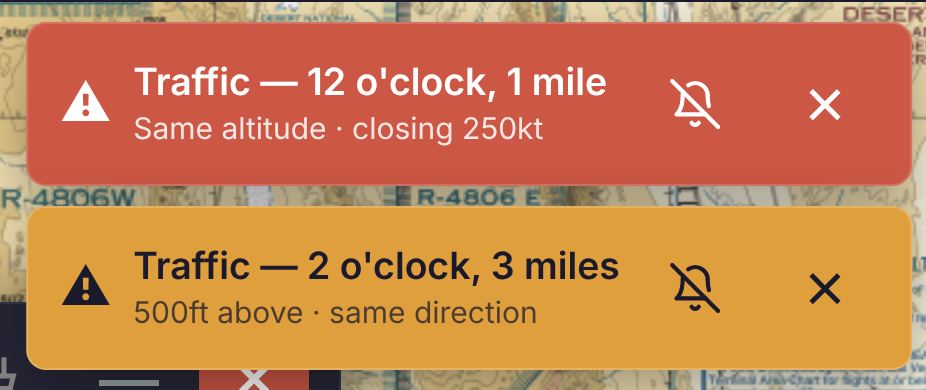
Traffic alerts include audible and visual callouts for nearby traffic when connected to an ADS-B receiver.* Whether advisory or warning, the alert contains the relative bearing, distance, and direction of the traffic. Also, a red ring is drawn around the target symbol on the map.
AHRS / Attitude Alerts
For pilots with AHRS hardware,* there is an alert for unusual attitude.
Default Thresholds
- Bank limit: 45°
- Pitch up limit: 20°
- Pitch down limit: -15°
- VS down limit: -2000 fpm
Runway Proximity Alert
Runway incursion awareness warns when taxiing toward or onto a runway environment. This alert is only triggered at ground speeds less than 30kts.
Vertical Speed to Target (VST)
This alert works in tandem with the VST instrument, which shows the required vertical speed to arrive at a target altitude at the destination airport pattern altitude. The instrument shows green for reasonable descent rates and amber for steep rates. The instrument is primarily a planning aid; however, it triggers an alert when excessive descent rates are required (caution : greater than 1500 fpm, warning: greater than 2500 fpm).
Flight Plan Deviation Alert
This alerts when the aircraft deviates from the planned route beyond a configured cross-track error threshold.
Oxygen Alert
Reminds pilot to go on supplemental oxygen when climbing above configured altitude. This is a one-time, informational alert. It does not reoccur like Traffic or Terrain. The default notification occurs at 10,000 ft MSL, which gives pilots a buffer of 2,500 ft to set up their oxygen before reaching the FAA’s altitude threshold, but this threshold is configurable.
GUMPS Checklist Reminder
- Gas — fullest tank, fuel pump on
- Undercarriage — gear down and locked (if applicable)
- Mixture — rich (below 3,000 ft)
- Props — set for landing
- Switches/Seatbelts — lights, belts fastened
This informational reminder is great for approach preparation. You can choose your own descent altitude trigger, upon which the alert reminds you to follow the GUMPS checklist.
Pre-Flight Route Monitoring
After filing a flight plan, OpenSkiesNav monitors the route and sends push notifications when conditions affecting the flight change. This begins 2 hours before departure time and checks every 15 minutes. As push notifications, these will appear both in the app as a red badge on the flight plan icon, as well as notifications in your device notification drawer.
Monitored Conditions
- New TFRs intersecting the route
- Airport/runway closed NOTAMs at departure or destination
- SIGMETs / Convective SIGMETs along route
- G-AIRMETs (IFR, icing, turbulence) along route
- Urgent PIREPs along route
- CWAs (Center Weather Advisories)
Every Pilot Deserves Safety
All of our in-flight alerts are available in all OpenSkiesNav subscription tiers, including the free version.
*OpenSkiesNav currently supports Stratux ADS-B integration for certain in-flight alerts.